> ## Documentation Index
> Fetch the complete documentation index at: https://alguna.com/docs/llms.txt
> Use this file to discover all available pages before exploring further.
# Sending Quotes
> Send a quote to the customer for e-signature, or activate it directly when the contract was signed elsewhere
Sending a quote is the step between a finished order form and a live subscription. From the quote you either **request the customer's signature** (Alguna emails a signing link, tracks the signature, and activates the subscription when it is signed and the start date arrives) or **activate directly** when the contract was already signed outside Alguna. Both paths end in the same [subscription](/docs/subscriptions/overview-subscriptions); the difference is who signs, and where. This page covers the sending side; [Signing Quotes](/docs/quotes/sign-quotes) shows what the customer sees.
Sending and signing happen in the dashboard; there are no public API endpoints for quotes. When the signed quote activates, the subscription is readable via the API and a `subscription.activated` [webhook](/docs/api-reference/v2/webhooks) fires, so downstream systems can react without polling.
Open the quote and click **Activate Subscription**. You are offered two options:
* **Activate Subscription** — use this when you already hold a signed contract and want billing to start on the contract start date. The subscription becomes `active` (or `accepted` until the start date arrives) with no customer action.
* **Request Customer Signature** — use this to send the quote to the customer for review and e-signature. The subscription only activates once the customer signs and the start date is reached.
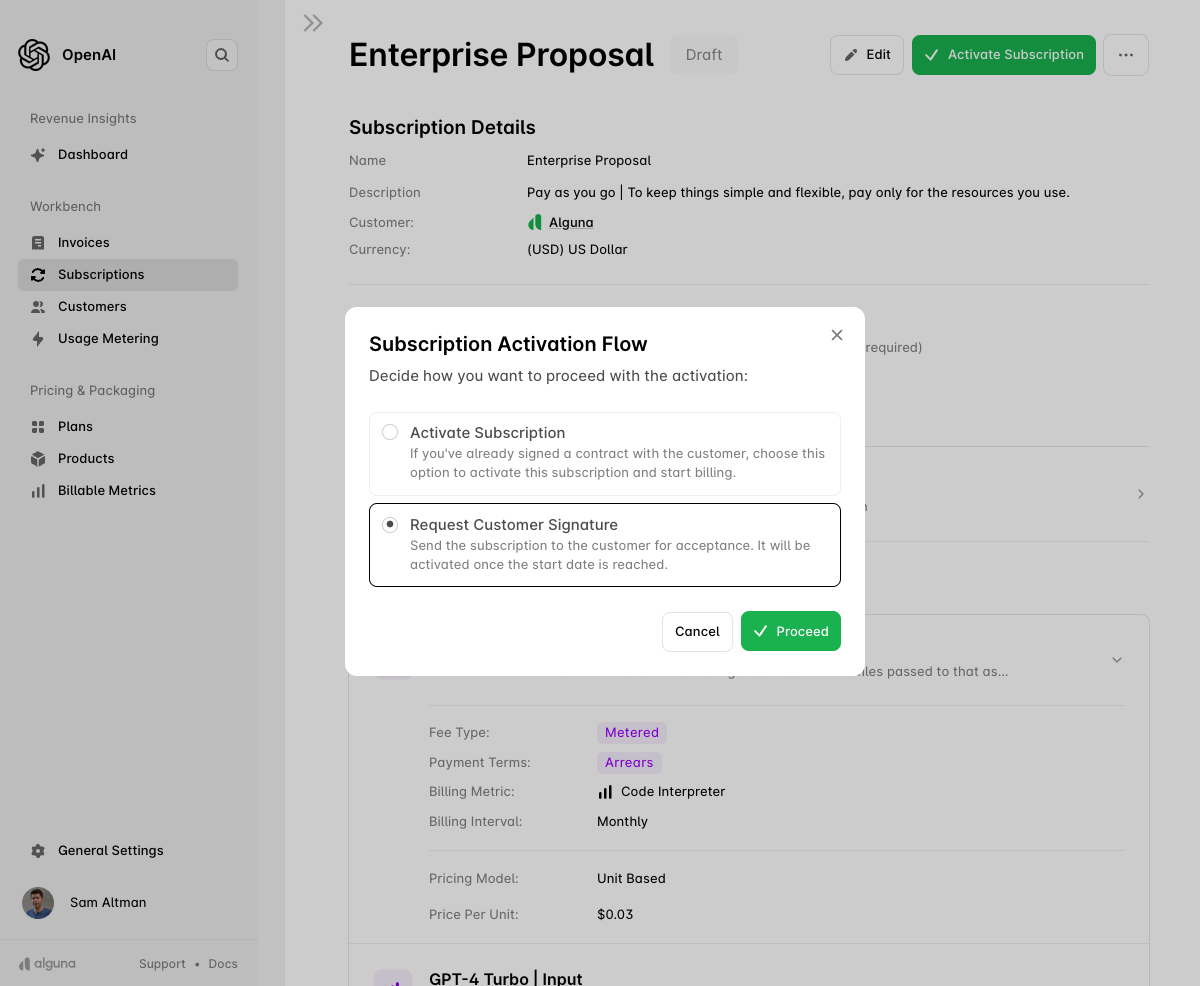 Select **Request Customer Signature** and click **Proceed**.
* **Email address** — confirm where the signing invitation goes. By default it is sent to the customer's contact with the **Legal** email preference; see [Customer Contacts](/docs/customers/customer-contacts).
* **Copy link** — copy the unique signing link to share through your own channel instead.
* **Internal countersignature** — if your contracts require both parties to sign, add an internal signer. The subscription does not activate until both signatures are in.
Select **Request Customer Signature** and click **Proceed**.
* **Email address** — confirm where the signing invitation goes. By default it is sent to the customer's contact with the **Legal** email preference; see [Customer Contacts](/docs/customers/customer-contacts).
* **Copy link** — copy the unique signing link to share through your own channel instead.
* **Internal countersignature** — if your contracts require both parties to sign, add an internal signer. The subscription does not activate until both signatures are in.
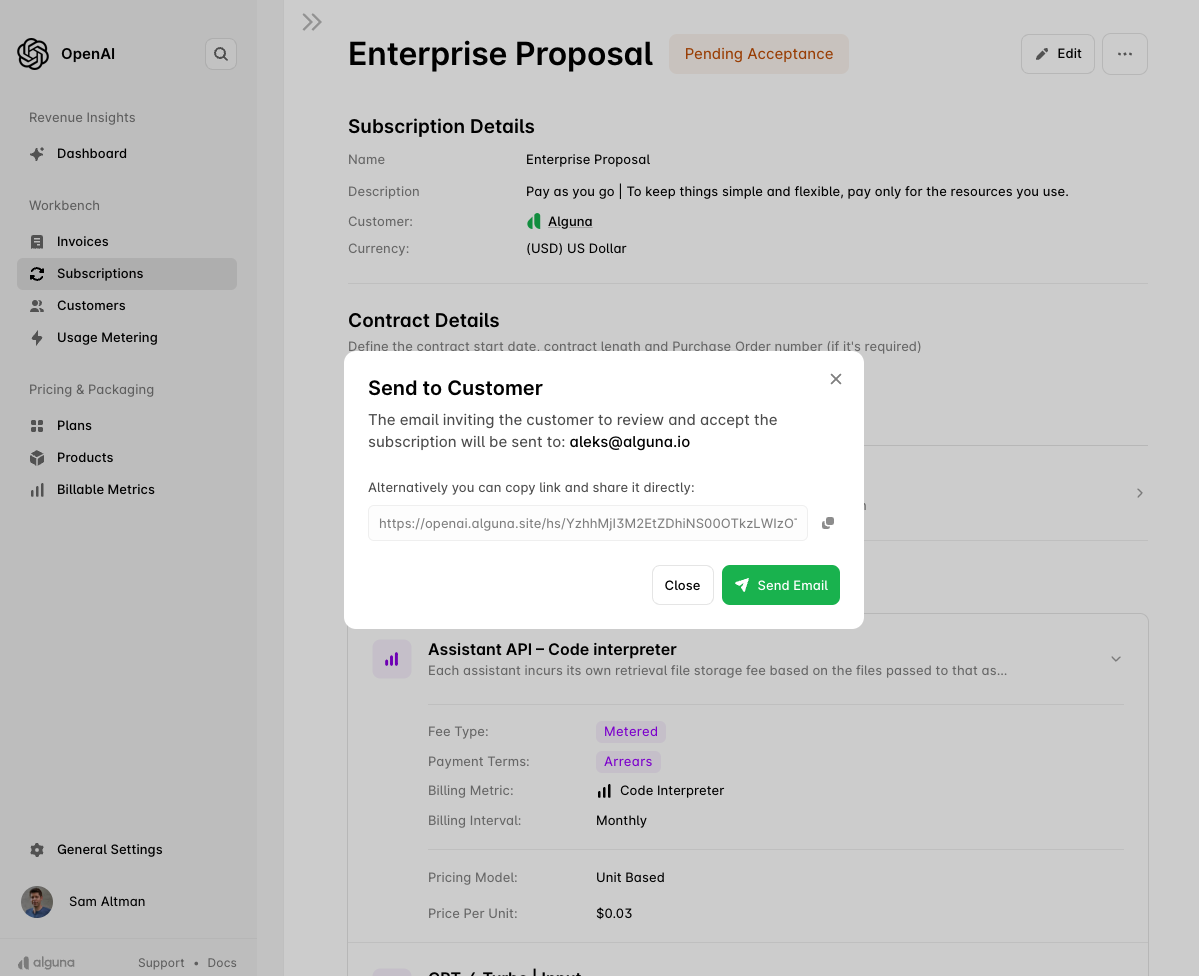 Click **Send Email**. The customer receives an invitation to review and sign.
While the signature is outstanding the quote shows as **Sent**. You can still edit the quote in this state. If the quote carries an expiry date and it passes without a signature, the quote becomes **Expired**. You can also **Withdraw** a sent quote to pull it back.
The customer reviews the terms, pricing and billing intervals and signs electronically. On signature:
* the quote becomes **Signed** and the subscription becomes `accepted`;
* both you and the customer receive a confirmation email;
* the signed PDF is attached to the subscription, downloadable in the dashboard or via [`GET /subscriptions/{id}/pdf`](/docs/api-reference/v2/2026-04-01/subscriptions/download-a-subscription-pdf);
* on the contract start date the subscription becomes `active`, billing begins, and `subscription.activated` fires.
To see the customer-facing flow, read [Signing Quotes](/docs/quotes/sign-quotes).
***
## After activation
The signed quote is now an ordinary subscription. Everything downstream is automatic and API-visible:
| What | Where |
| - | - |
| Subscription record, status and contract dates | [`GET /subscriptions/{id}`](/docs/api-reference/v2/2026-04-01/subscriptions/get-a-subscription) |
| The priced items the customer signed for | [`GET /subscriptions/{id}/versions/current`](/docs/api-reference/v2/2026-04-01/subscription-versions/get-the-current-active-subscription-version) |
| Feature access the deal grants | [`GET /subscriptions/{id}/entitlements`](/docs/api-reference/v2/2026-04-01/subscriptions/list-active-entitlements) |
| Invoices as they are generated | [Invoices](/docs/invoices/recurring-invoices) and `invoice.issued` webhooks |
| Revenue schedule for the contract | [`GET /revenue-schedules/subscription/{id}`](/docs/api-reference/v2/2026-04-01/revenue-schedules/get-revenue-schedule-for-a-subscription) |
To change the deal later, use an [amendment](/docs/subscriptions/amendments): an amendment quote can be sent for signature in exactly the same way.
This documentation is built and hosted on [Mintlify](https://mintlify.com), a developer documentation platform.
Click **Send Email**. The customer receives an invitation to review and sign.
While the signature is outstanding the quote shows as **Sent**. You can still edit the quote in this state. If the quote carries an expiry date and it passes without a signature, the quote becomes **Expired**. You can also **Withdraw** a sent quote to pull it back.
The customer reviews the terms, pricing and billing intervals and signs electronically. On signature:
* the quote becomes **Signed** and the subscription becomes `accepted`;
* both you and the customer receive a confirmation email;
* the signed PDF is attached to the subscription, downloadable in the dashboard or via [`GET /subscriptions/{id}/pdf`](/docs/api-reference/v2/2026-04-01/subscriptions/download-a-subscription-pdf);
* on the contract start date the subscription becomes `active`, billing begins, and `subscription.activated` fires.
To see the customer-facing flow, read [Signing Quotes](/docs/quotes/sign-quotes).
***
## After activation
The signed quote is now an ordinary subscription. Everything downstream is automatic and API-visible:
| What | Where |
| - | - |
| Subscription record, status and contract dates | [`GET /subscriptions/{id}`](/docs/api-reference/v2/2026-04-01/subscriptions/get-a-subscription) |
| The priced items the customer signed for | [`GET /subscriptions/{id}/versions/current`](/docs/api-reference/v2/2026-04-01/subscription-versions/get-the-current-active-subscription-version) |
| Feature access the deal grants | [`GET /subscriptions/{id}/entitlements`](/docs/api-reference/v2/2026-04-01/subscriptions/list-active-entitlements) |
| Invoices as they are generated | [Invoices](/docs/invoices/recurring-invoices) and `invoice.issued` webhooks |
| Revenue schedule for the contract | [`GET /revenue-schedules/subscription/{id}`](/docs/api-reference/v2/2026-04-01/revenue-schedules/get-revenue-schedule-for-a-subscription) |
To change the deal later, use an [amendment](/docs/subscriptions/amendments): an amendment quote can be sent for signature in exactly the same way.
This documentation is built and hosted on [Mintlify](https://mintlify.com), a developer documentation platform.